Unmasking Databricks AI Workload Costs: 3 Traps and How to Track Them
A data engineering team recently ran ai_query() across 40 million customer records for a sentiment classification task. Because it was wrapped in a simple SQL statement, it felt like a standard transformation. The job completed in a few hours. A few days later, the billing dashboard showed a massive spike in an unexpected category: MODEL_SERVING.
Nobody had checked the impact on system.billing.usage before kicking it off.
This scenario is becoming increasingly common. As Databricks democratizes AI natively within SQL and notebooks, it has never been easier to implement GenAI, vector searches, and natural language bi-directional querying. However, the cost model for these powerful features has a few layers that aren’t obvious until you’ve been stung by them.
If you are running AI/ML workloads on Databricks, here is a breakdown of the three most common cost traps, alongside the SQL queries you need to gain visibility using System Tables.
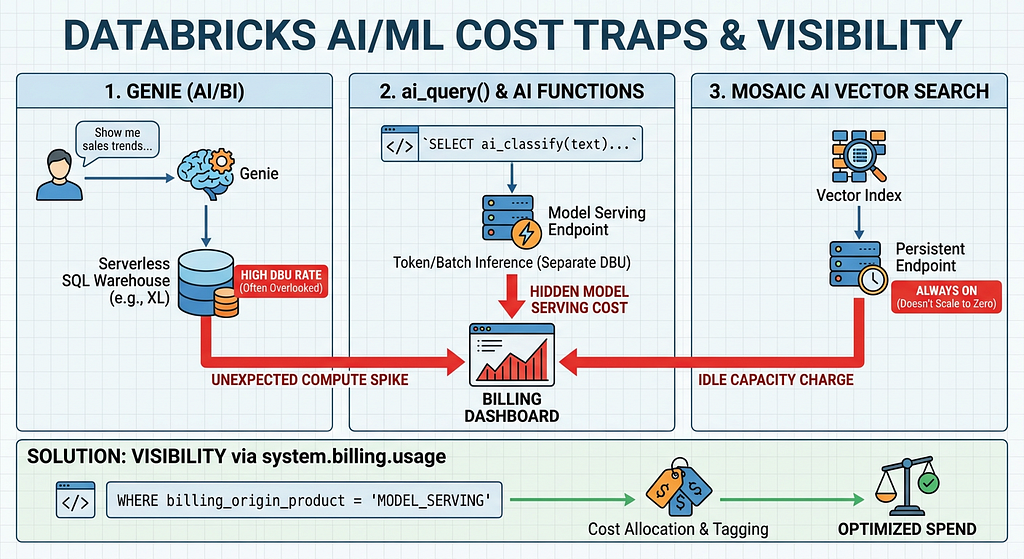
Trap 1: Genie (AI/BI) and the “Free” Illusion
Databricks Genie allows non-technical users to query data using natural language. There is no separate “Genie fee” or per-question AI charge. Because of this, it often feels free to deploy.
The Reality:
Genie translates natural language into SQL and executes it against a traditional Databricks SQL Warehouse — specifically, a Serverless or Pro warehouse assigned to that Genie space.
The Trap:
The trap is warehouse sizing. Because the AI feature itself has no explicit cost, teams often forget to right-size the underlying compute. A default X-Large Serverless warehouse backing a Genie space burns Databricks Units (DBUs) at the exact same rate whether it’s running a massive ETL pipeline or answering a business user’s simple prompt about yesterday’s sales. If the warehouse auto-stops are configured poorly, that compute stays warm, burning unnecessary DBUs.
How to track it:
You need to monitor the compute costs of the specific warehouses tied to your AI/BI spaces.
SELECT
  usage_date,
  workspace_id,
  custom_tags['EndpointName'] as sql_warehouse_name,
  SUM(usage_quantity) as total_dbus,
  billing_origin_product
FROM system.billing.usage
WHERE billing_origin_product = 'SQL'
  -- Replace with the specific tags or names of your Genie warehouses
  AND custom_tags['EndpointName'] IN ('genie_finance_wh', 'genie_marketing_wh')
GROUP BY 1, 2, 3, 5
ORDER BY usage_date DESC;
Trap 2: ai_query() and the AI Functions Disconnect
Databricks introduced built-in AI functions (ai_classify, ai_summarize, ai_generate, and the generic ai_query()) to make calling LLMs as easy as writing a SELECT statement.
The Reality:
While the syntax is standard SQL, the execution engine is not. These functions route requests to AI endpoints managed under Mosaic AI Model Serving.
The Trap:
Whether you are hitting Foundation Model APIs (pay-per-token) or using Provisioned Throughput for batch inference, Model Serving has its own distinct DBU rate. When a data engineer runs a massive batch job with ai_query(), the cost doesn't show up in the "Jobs" or "SQL Compute" buckets they normally monitor. It lands entirely in "Model Serving." If your FinOps dashboards aren't built to distribute or tag MODEL_SERVING costs back to the data engineering teams running the pipelines, this spend becomes a black box.
How to track it:
Filter your billing table specifically for Model Serving usage and break it out by the identity or workspace kicking off the queries.
SELECT
  usage_date,
  usage_metadata.endpoint_name,
  sku_name,
  SUM(usage_quantity) as total_dbus
FROM system.billing.usage
WHERE billing_origin_product = 'MODEL_SERVING'
GROUP BY 1, 2, 3
ORDER BY total_dbus DESC;
Trap 3: Mosaic AI Vector Search Idle Capacity
Vector databases are fundamental to Retrieval-Augmented Generation (RAG) applications. Databricks Vector Search provides a fully managed vector database seamlessly integrated with Unity Catalog.
The Reality:
Vector Search relies on persistent compute endpoints to ensure ultra-low latency for similarity searches.
The Trap:
Unlike some Serverless SQL warehouses, standard Vector Search endpoints do not scale to zero automatically when not in use. They hold provisioned capacity for as long as an index exists on that endpoint.
The biggest trap occurs during prototyping. An engineer spins up an endpoint, creates a test index, finishes their PoC, and moves on. An unused index quietly accumulates idle capacity charges 24/7. Furthermore, deleting the index is not enough. To stop the billing, you must delete the endpoint itself, or the system will wait 24 hours after the final index is deleted before scaling the endpoint down to zero.
How to track it:
Look for Vector Search DBUs to spot endpoints that might be running idle or are over-provisioned.
SELECT
  usage_date,
  custom_tags['VectorSearchEndpointName'] as vector_endpoint,
  SUM(usage_quantity) as total_dbus
FROM system.billing.usage
WHERE sku_name LIKE '%Vector_Search%'
GROUP BY 1, 2
ORDER BY usage_date DESC;
The Master Query: Building Your AI Cost Dashboard
The common thread across all three of these features is that the cost is very real, but it routes through SKUs and products that traditional IT dashboards don’t break out by default.
To get ahead of this, you should set up a saved query or Databricks SQL dashboard using the system.billing.usage table. Here is a high-level query to aggregate your AI-specific spend:
SELECT
  usage_date,
  CASE
    WHEN billing_origin_product = 'MODEL_SERVING' THEN 'Model Serving (ai_query, endpoints)'
    WHEN sku_name LIKE '%Vector_Search%' THEN 'Vector Search'
    WHEN custom_tags['Project'] = 'Genie' THEN 'Genie SQL Compute'
    ELSE 'Other Compute'
  END AS ai_workload_category,
  SUM(usage_quantity) as total_dbus
FROM system.billing.usage
WHERE usage_date >= current_date() - 30
GROUP BY 1, 2
HAVING ai_workload_category != 'Other Compute'
ORDER BY usage_date DESC, total_dbus DESC;
*(Note: The Genie categorization assumes you are using Workspace Tags like *Project = Genie on your warehouses—a highly recommended best practice).
Conclusion
Databricks provides incredible native AI capabilities, but the resulting abstractions can muddy the waters of cloud cost management. By understanding how Genie uses serverless warehouses, how ai_query() leverages Model Serving, and how Vector Search provisions endpoints, you can avoid end-of-month surprises.
Start querying your system.billing.usage table today, enforce rigorous tagging on your endpoints, and ensure your data engineers understand the true cost of that seemingly harmless SELECT ai_summarize() command.